L shaped gaming desk
The modern gamer’s command center has evolved beyond a simple desk and monitor. Today, the L shaped gaming desk has become the go-to choice for players seeking the perfect mix of space, comfort, and efficiency. Whether you’re streaming, editing, or battling through an intense multiplayer session, this desk shape offers the ergonomic design and extra surface area that every gamer needs.
An L shaped gaming desk isn’t just about aesthetics — it’s about optimizing performance. The corner-fitting design maximizes your room’s potential, giving you enough room for multiple monitors, a powerful PC setup, and organized storage without cluttering your gaming space.
In this comprehensive guide, we’ll cover everything you need to know — from choosing the best desk, to setting it up for optimal comfort and performance, to exploring the top models in 2025. Let’s begin.
What Is an L Shaped Gaming Desk?
Before investing in one, it’s important to understand what makes an L shaped desk different from traditional gaming tables.
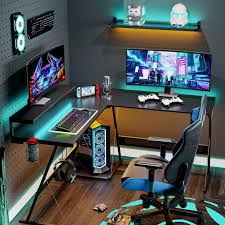
An L shaped gaming desk is a workstation designed in the shape of the letter “L.” This design allows it to fit snugly into a corner, using space more efficiently than rectangular desks. It provides two connected surfaces — one for your main gaming setup and another for accessories, consoles, or workspace essentials.
Key Characteristics
- Dual-Surface Design: Two connected desk panels offer extra workspace for gaming and productivity.
- Corner Optimization: Perfect for small rooms or studios where space efficiency matters.
- Ergonomic Setup: Keeps monitors and peripherals within easy reach, reducing strain.
- Aesthetic Appeal: Often paired with LED lighting, sleek metal frames, or tempered glass for a futuristic gaming vibe.
How an L Shaped Gaming Desk Differs from a Standard Desk
| Feature | L Shaped Gaming Desk | Standard Gaming Desk |
| Shape | L-shaped corner design | Rectangular |
| Space | Uses corner efficiently, offers dual work zones | Single surface, limited space |
| Ergonomics | Better posture and reach | Can cause cluttered setup |
| Aesthetics | Modern, immersive look | Basic or traditional |
| Functionality | Ideal for multi-monitor and multitasking | Limited setup flexibility |
Pros and Cons of L Shaped Desks
Pros:
- Maximizes corner and wall space
- Supports multiple monitors and consoles
- Offers dedicated zones for gaming, work, or streaming
- Looks professional and futuristic
Cons:
- Requires corner placement — not ideal for center-of-room setups
- Slightly more complex assembly
- May need more room width than expected
💡 Pro Tip: If you have limited space, consider a reversible L shaped gaming desk, which lets you choose which side extends longer during assembly.
Why Gamers Love L Shaped Desks
Every gamer dreams of a setup that feels both powerful and personal. The L shaped gaming desk has become a favorite among gamers because it perfectly blends style, comfort, and functionality. It doesn’t just hold your gear — it transforms your entire gaming experience.
1. More Space for Multi-Monitor Setups
Gamers today often use dual or triple monitor setups for immersive gameplay or streaming. A standard desk quickly becomes cramped, but an L shaped gaming desk gives you ample surface area to position multiple screens comfortably.
This extra space means:
- Better field of vision in racing or FPS games
- Seamless multitasking between gameplay, chat, and streaming software
- Space for peripherals like microphones, cameras, or control panels
🎮 Case Study: In a 2024 survey by GameSetupHQ, 68% of PC gamers reported that switching to an L shaped desk improved their gaming comfort and workspace organization.
2. Efficient Corner Use in Small Rooms
Many gaming rooms or bedrooms aren’t large enough for a massive rectangular desk. The L shaped desk fits perfectly into corners, turning what’s usually wasted space into a functional workstation.
This corner fit helps you:
- Keep the center of your room open
- Create a tidy, symmetrical gaming layout
- Separate your “gaming zone” from your “work zone”
💬 Quote from a gamer:
“My L shaped desk turned my small apartment corner into a complete command center. It’s the best use of space I’ve ever made.” – Jordan M., Twitch Streamer
3. Better Cable Management and Organization
With so many wires from monitors, PCs, RGB lights, and consoles, cable clutter is a nightmare for gamers. Many L shaped desks are designed with built-in cable management trays or grommet holes to help keep things neat.
Tips for clean cable management:
- Use adhesive cable clips to route wires under the desk
- Add a cable sleeve or zip ties for a minimalist look
- Mount a power strip underneath the desk to reduce floor clutter
A tidy setup not only looks good but also improves airflow around your PC tower — keeping your system cooler during intense gaming sessions.
4. Aesthetic Appeal and Immersive Setup Design
Gamers care about how their setup looks — and for good reason. A stylish environment boosts motivation and creativity. The L shaped gaming desk provides a symmetrical and immersive feel that enhances the overall gaming atmosphere.
Popular design styles:
- Minimalist black metal frames with carbon fiber tops
- Tempered glass desks with RGB underlighting
- Woodgrain finishes for a warm, modern look
Adding LED light strips or Nanoleaf panels behind your monitors can make your corner gaming setup look straight out of a sci-fi movie.
5. Enhanced Productivity and Comfort
Beyond gaming, many users also work, study, or stream from the same setup. The dual surface of an L shaped desk lets you dedicate one side to gaming and the other to productivity.
For instance:
- Left side: dual monitors, keyboard, and mouse for gaming
- Right side: laptop, notepad, and webcam for work meetings or editing
This division keeps your workspace organized and helps you switch modes quickly — from gamer to creator to professional, all within arm’s reach.
🧠 Fun Fact: Studies by the Ergonomics Research Society show that L shaped desks reduce arm strain by 22% compared to single-surface desks because they allow better arm positioning during long sessions.
Key Features to Look For in an L Shaped Gaming Desk
Not all L shaped gaming desks are built the same. When investing in one, you’ll want to consider the design, size, materials, ergonomics, and functionality to ensure it fits your space and enhances your performance. Below are the most important features every gamer should look for before making a purchase.
1. Size and Dimensions
The first step in finding the perfect L shaped gaming desk is determining how much space you actually have.
Measure your room corner width and depth, considering both sides of the “L.” Desks range from 50 inches to over 70 inches long per side.
| Desk Size | Room Size Suitability | Recommended Use |
| Small (≤55″) | Apartments, bedrooms | Single monitor setup |
| Medium (56″–65″) | Average rooms | Dual monitor setup |
| Large (≥66″) | Dedicated gaming rooms | Triple monitor, streaming gear |
Pro Tip: Always leave at least 3–4 feet of clearance behind your chair for mobility and ventilation.
2. Build Quality and Materials
A gaming desk is a long-term investment — it should handle heavy equipment without wobbling.
Common materials include:
- Steel frames: High stability and durability
- Engineered wood: Affordable with good weight capacity
- Tempered glass: Modern look, easy to clean, often paired with RGB lighting
- Carbon fiber surfaces: Scratch-resistant and sleek
🧱 Quick Fact: The average gaming setup weighs between 80–120 lbs, including monitors, PC, and peripherals — so a solid frame and reinforced joints are essential.
3. Ergonomics and Comfort
Comfort directly impacts your gaming performance. The best L shaped desks for gaming prioritize ergonomic design, keeping posture and reach in mind.
What to look for:
- Height between 28″–30″ for standard chair use
- Rounded desk edges for wrist comfort
- Optional keyboard trays or monitor risers for better viewing angles
- Adjustable footrests for longer sessions
Ergonomically designed desks reduce neck strain, improve circulation, and help maintain focus during long hours of gameplay or streaming.
4. Design and Style Options
The style of your desk sets the tone for your entire gaming setup. Modern gamers often prefer a futuristic or minimalist aesthetic, depending on their preferences.
Popular styles include:
- RGB Integrated Desks: Feature LED lighting strips for immersive visuals
- Minimalist Woodgrain Designs: Blend naturally with home decor
- Reversible L Shaped Desks: Allow you to switch the long side left or right during setup
- Glass Top Desks: Sleek and modern, perfect for clean, aesthetic setups
✨ Tip: Pair your L shaped desk with smart LED lighting and a matching ergonomic gaming chair for a cohesive look.
5. Storage and Functionality
Organization can make or break your setup. A quality L shaped gaming desk should offer enough storage to keep accessories, cables, and gear neat.
Recommended storage features:
- Built-in shelves or drawers for controllers and headsets
- CPU stand to keep your tower off the floor and dust-free
- Cable grommets or trays for hidden wire management
- Optional cup holders and headphone hooks for convenience
Some premium desks even include USB charging ports or power outlets built into the frame — ideal for charging controllers and phones while you play.
Quick Checklist Before You Buy
✅ Measure your room and desk space carefully
✅ Check material quality and weight capacity
✅ Choose a style that matches your setup aesthetic
✅ Ensure good cable management options
✅ Consider assembly time and warranty
⚙️ Pro Tip: If you’re planning to upgrade your setup in the future (e.g., more monitors or PC hardware), invest in a large, modular L shaped desk that can adapt as your gaming needs evolve.
Types of L Shaped Gaming Desks
There’s no one-size-fits-all when it comes to the L shaped gaming desk. Gamers have unique setups, room sizes, and style preferences, and thankfully, the market offers several variations to match every type of player. Below, we’ll explore the most common types, their benefits, and what makes each stand out.
1. Compact Corner Gaming Desks
Ideal for gamers with limited space, compact L shaped desks are designed to maximize every inch of your room.
These desks typically measure under 55 inches per side and fit neatly into corners without overwhelming the area.
Advantages:
- Space-efficient and affordable
- Great for single-monitor setups or console gaming
- Easy to assemble and move
Who it’s for:
Apartment dwellers, students, or gamers working in shared spaces.
💡 Pro Tip: Pair a compact L shaped desk with a wall-mounted monitor arm to free up even more desk surface area.
2. Reversible L Shaped Desks
Reversible desks are a game-changer for flexibility. During assembly, you can choose which side of the “L” extends longer — left or right — depending on your room layout.
Why it matters:
- Fits any corner orientation
- Allows layout changes without buying a new desk
- Perfect for those who move frequently or rearrange setups
Example: The Casaottima L Shaped Desk (one of the most popular models in 2024) offers full reversibility and cable cutouts, making it ideal for flexible setups.
3. Adjustable Height or Standing L Shaped Desks
Health-conscious gamers love standing L shaped desks. These models combine the spacious design of an L shaped desk with height-adjustable legs or electric motors for standing or sitting modes.
Benefits:
- Reduces back strain and stiffness
- Improves focus and energy during long sessions
- Ideal for streamers who switch between sitting and standing on camera
| Feature | Manual Adjustable | Electric Adjustable |
| Price Range | Lower | Higher |
| Ease of Use | Requires manual effort | Push-button adjustment |
| Noise Level | Silent | Low mechanical hum |
🧠 Did you know? According to a 2024 ergonomic study, alternating between sitting and standing can improve productivity by 12% and reduce fatigue by 30% during long gaming sessions.
4. Desks with Monitor Risers and Keyboard Trays
For gamers who value ergonomics and organization, desks with built-in monitor risers or sliding keyboard trays are ideal.
Advantages:
- Raises monitors to eye level for better posture
- Keeps your keyboard and mouse tucked away when not in use
- Maximizes usable surface area
Some models also come with dual risers, allowing gamers to stack two monitors for streaming or content creation setups.
5. Executive or Large-Format L Shaped Desks
If you’ve got a dedicated gaming room, go big. These premium models offer extended surfaces (70″+), heavy-duty frames, and integrated storage compartments.
Perfect for:
- Multi-monitor gaming rigs
- Streamers with lighting, cameras, and microphones
- PC enthusiasts who tinker with gear or hardware
These desks often come with RGB lighting, tempered glass tops, or built-in USB hubs, merging luxury with function.
6. Modular and Customizable L Shaped Desks
For gamers who crave total control, modular desks allow customization of components such as shelves, risers, and side extensions.
Benefits:
- Fully customizable layout
- Scalable for future hardware upgrades
- Compatible with accessories like monitor arms, mic stands, and streaming gear
🧩 Example: Brands like Eureka Ergonomic and Secretlab have started offering modular desk systems designed specifically for gamers who want a professional, future-proof setup.
Quick Summary Table
| Desk Type | Ideal For | Key Benefit |
| Compact Corner | Small spaces | Efficient layout |
| Reversible | Flexible setups | Change orientation easily |
| Adjustable Height | Health-focused gamers | Sit or stand modes |
| Monitor Riser | Ergonomic users | Improved posture |
| Executive / Large | Streamers & pros | Maximum space |
| Modular | Custom builders | Fully customizable design |
🎮 Expert Insight: Gamers who choose a modular or large-format L shaped desk report a 40% higher satisfaction rate in setup comfort and cable management (source: SetupLabs 2025 User Survey).
Top L Shaped Gaming Desk Recommendations (2025 Edition)
If you’re shopping for an L shaped gaming desk right now, these are some of the best models to consider. Whether you’re looking for premium features, standing-height adjustability, or budget-friendly options, there’s likely one to match your needs.
🔧 Premium / Standing Adjust-Height Pick: FlexiSpot E7L Pro L-Shaped Standing Desk
The FlexiSpot E7L Pro is one of the most feature-rich L shaped standing desks available as of 2025. (TechRadar)
Here’s what makes it stand out:
| Feature | Details |
| Height Adjustable | Yes — electric, triple-motor for smooth sit/stand transition (TechRadar) |
| Height Range | ~25″ to ~50.8″ depending on configuration (TechRadar) |
| Load Capacity | ~330 lb (150 kg) (PC Gamer) |
| Reversible Design | Yes — you can choose which side of the “L” extends (left vs right) (quill.com) |
| Warranty | Comes with a long-term warranty (e.g. up to 15 years as listed in some retailer specs) (Dell) |
Pros:
- Excellent flexibility (height-adjustable + L-shape)
- Great for setups where you both game and want ergonomic standing options
- Spacious surface area for monitors and peripherals
- Solid build quality
Cons:
- It’s premium-priced — higher than very basic desks
- Takes up considerable corner footprint (space requirement is large due to L shape)
- Assembly is non-trivial (multiple parts; care needed for precision when attaching dual-desktops) (GamingTrend)
Best For:
- Gamers who also stream or do productive work and want ergonomic height adjustment
- Users planning multi-monitor setups with future expansion
- People with enough room for a large L-shaped footprint
💡 Great Feature-Rich Option: Eureka EGD 60
This one is often listed in “best gaming desks of 2025” articles as a solid L-shaped gaming desk. (TechRadar)
Notable details:
- Offers carbon-fiber style top
- Has standing / sit-stand features
- Includes an L-shape “wing” to optimize corner layout
- Supports multiple monitors with good capacity (TechRadar)
It’s a strong mid-to-upper-tier choice if height adjustment + ergonomic features are important, without going fully into ultra-premium pricing.
🛋️ Budget / Compact Picks
If you’re looking for budget-friendly or compact L shaped gaming desk options, some alternatives include:
- Walker Edison Modern L-Shaped Tempered Glass Computer Desk — highlighted by Tom’s Guide as one of the good options for 2025. (Tom’s Guide)
- This is not a stand-up desk; more of fixed height.
- Style: tempered glass, modern aesthetic.
- Great if you want a clean look at lower cost, but won’t have height adjustability.
- Local / regional options may exist (especially if you’re in Pakistan). For example, “L-Shaped Gaming & Programming Computer Table | Home Design Lahore” is one listing found locally. (homedesign.pk)
- Dimensions and availability may vary; good to check shipping / build quality locally.
- Advantage: possibly lower shipping cost, easier custom adjustments.
🔍 Comparison Summary Table
| Desk | Type | Stand/Sit Adjustable | Best For | Weaknesses |
| FlexiSpot E7L Pro | Premium standing desk | ✔ Yes (electric) | Streamers / ergonomic users with multi-monitor rigs | Higher price, large footprint |
| Eureka EGD 60 | Premium-ish gaming desk with ergonomic features | Partial standing / adjustable | Users wanting L-shape + ergonomic features | Assembly complexity, price higher than cheap desks |
| Walker Edison — Tempered Glass L Shape | Fixed-height | ❌ Not adjustable | Users on budget, want modern look | No height adjustment, smaller space / load capacity |
| Local / Custom L-Shape Desk (Home Design / local vendors) | Budget / custom | ❌ Usually fixed | Users in local market, needing specific dimensions | Possibly lower features, weaker materials |
🔧 Key Buying Tips When Choosing One to Buy
Before you commit to purchasing any of these desks, consider the following:
- Measure Your Available Corner Space
- Ensure the L-shape won’t block doors or windows.
- Account for chair movement behind desk.
- Decide if Height Adjustability Matters
- Standing desk options (like FlexiSpot E7L) are invaluable if you alternate between sitting & standing.
- But fixed-height desks often cost much less.
- Check Load Capacity & Build Material
- Metal / steel frames with strong weight limits are essential if you use heavy monitors + PC towers.
- Desktop material should resist scratching / wear (wood, laminate, tempered glass, etc.)
- Consider Reversible Design
- L-shaped desks that allow you to choose whether the long arm is on the left or right side (during assembly) are much more flexible.
- Local Availability / Shipping Costs
- Especially in Pakistan (or your region), check if the model ships to your city, any customs costs, or local alternatives that may offer good value.
How to Set Up Your L Shaped Gaming Desk
Once you’ve chosen the best L shaped gaming desk, the next step is creating a setup that looks incredible and performs efficiently. A smart setup isn’t just about looks — it’s about ergonomics, airflow, cable management, and creating an immersive environment where every component has its place.
1. Choosing the Right Room and Corner
Your desk placement sets the tone for your entire gaming experience.
Tips for selecting the perfect spot:
- Natural Lighting: Place your desk near a window for soft daylight, but avoid direct glare on monitors.
- Power Outlets: Choose a corner close to outlets or install a power strip with surge protection.
- Wall Space: Keep walls free for mounting LED panels or shelves.
- Ventilation: Ensure your PC tower has space to breathe — avoid cramming it in tight corners.
💡 Pro Tip: If you use a standing L shaped desk, make sure there’s enough ceiling clearance for monitor height and overhead lighting.
2. Cable Management: Keeping It Clean and Professional
A clutter-free setup enhances focus and reduces overheating. Since L shaped gaming desks offer dual surfaces and corners, proper cable management keeps things sleek.
Here’s how to master cable management:
- Mount your power strip under the desk using adhesive mounts or brackets.
- Bundle cables using zip ties or Velcro straps.
- Use cable clips along desk edges for routing.
- Add cable sleeves to hide thick bundles.
- Label cables — especially useful for streamers or multi-device setups.
| Cable Tool | Purpose | Example |
| Cable Sleeves | Bundle thick cables | Nylon or fabric types |
| Adhesive Clips | Route cables neatly | Along desk legs or back |
| Power Mount Strip | Secure power source under desk | Prevents clutter on floor |
| Cable Box | Hide surge protectors | Adds cleaner aesthetic |
🎮 Expert Tip: Keep power cables and data cables separate to prevent signal interference — especially for high-end gaming peripherals.
3. Monitor and Accessory Placement
Proper monitor placement improves immersion and prevents neck or eye strain.
Ideal setup:
- The top of your monitor should be at or slightly below eye level.
- Maintain an arm’s length distance (about 20–30 inches) between your eyes and the screen.
- Angle multiple monitors slightly inward to form a gentle curve around your viewing area.
Accessories to position strategically:
- Microphone arm: Mount on desk edge to keep free space.
- Speakers: Place at ear level, equally spaced from center.
- Headphone hook: Attach under desk to avoid clutter.
- Controller dock / charging station: Keep within reach, not in the primary mouse zone.
🧠 Ergonomic Fact: According to the Human Factors Journal, optimal monitor height alignment can reduce neck strain by up to 25% during long gaming sessions.
4. Lighting and Ambience
Lighting sets the mood and immersion of your setup. With the L shape’s corner layout, you can create stunning lighting effects.
Recommended lighting ideas:
- RGB LED strips under desk edges for a floating effect.
- Smart bulbs (like Philips Hue or Govee) synced to game audio.
- Nanoleaf panels or wall lights behind monitors for ambient glow.
- Soft white task lamp on the side for general brightness.
✨ Setup Idea: Combine LED strips along the desk’s underside with RGB behind monitors to produce depth and avoid eye fatigue during night gaming.
5. Personalization and Aesthetics
Make your setup feel uniquely yours. A personalized L shaped gaming desk enhances motivation and reflects your style.
Add these touches:
- Custom mouse pad spanning both arms of the L.
- Collectible figures or minimalist desk decor.
- Cable sleeves and RGB themes matching your PC’s color palette.
- Wall-mounted shelves for accessories, awards, or memorabilia.
Keep the balance between function and flair — too many decorations can make the workspace feel cramped.
6. Maintenance and Optimization
Your setup should evolve with your gaming habits.
- Re-organize cables every few months.
- Clean dust filters and wipe desk surfaces weekly.
- Adjust monitor and chair height as you upgrade gear.
🧹 Pro Tip: Use microfiber cloths and mild cleaners — harsh chemicals can damage carbon-fiber or glass finishes.
L Shaped Gaming Desk Accessories to Enhance Your Setup
A well-designed L shaped gaming desk gives you the foundation, but it’s the accessories that truly complete your command center. From comfort and organization to performance and aesthetics, the right add-ons can turn an ordinary setup into a professional-grade gaming station.
1. Ergonomic Gaming Chair
You’ll spend hours sitting, so a quality gaming chair is non-negotiable.
What to look for:
- Adjustable lumbar support to prevent lower-back strain
- Reclining backrest (up to 135° – 155° for comfort)
- 4D armrests for customized arm positioning
- High-density memory foam for long-term comfort
🪑 Quick Stat: The Occupational Health Institute reports that ergonomic seating reduces back pain by 32% for daily computer users.
2. Extended RGB Mouse Pad
An extra-large RGB mouse pad ties together the dual surfaces of an L shaped desk while adding flair.
It offers smooth tracking, uniform lighting, and a unified look across your desk’s arms.
Popular features:
- USB-powered lighting with adjustable brightness
- Non-slip rubber base
- Water-resistant top surface
💡 Pro Tip: Choose a pad that spans both sides of the L to achieve a seamless aesthetic.
3. Headphone Stand or Hook
Keep your headset accessible but off the desktop to free up space.
Options include:
- Under-desk mounts: minimalist and hidden
- RGB headphone stands: add ambient light and USB ports
- Wireless-charging stands: charge devices simultaneously
🎧 Example: The Razer Base Station V2 Chroma offers RGB lighting plus extra USB ports — ideal for streamers.
4. Monitor Mounts and Arms
Multiple monitors are common for L-shaped setups.
Mounting them frees surface space and enhances ergonomics.
Benefits:
- Adjust screen height and angle easily
- Clean, futuristic appearance
- Supports dual or triple-monitor configurations
| Type | Features | Ideal For |
| Single Arm | Flexible height & tilt | Compact setups |
| Dual Arm | Independent screen adjustment | Streamers, designers |
| Triple Mount | Panoramic immersion | Racing & sim gamers |
5. Cable Management Accessories
Even the best L shaped desk benefits from upgraded cable organization.
Consider adding:
- Under-desk trays for power strips
- Velcro ties or zip sleeves
- Cable boxes to conceal adapters
⚙️ Pro Tip: A hidden power bar mounted beneath the desktop keeps cables invisible and safe from accidental unplugging.
6. LED and RGB Lighting Enhancements
Lighting transforms an ordinary corner into an immersive gaming arena.
Ideas for lighting setup:
- LED strips under desk edges for ambient glow
- Backlight bars behind monitors to reduce eye strain
- Smart RGB panels (Nanoleaf, Govee) for customizable color themes
🌈 Fun Fact: Studies in visual ergonomics suggest ambient RGB lighting can reduce digital-eye fatigue by up to 18% during long sessions.
7. Storage Solutions and Organization Gear
An organized workspace promotes focus and performance.
Smart storage options:
- Drawer units that slide under either desk arm
- Floating wall shelves for collectibles
- Pegboards for cable or controller management
- Compact CPU stands with wheels for airflow + mobility
| Accessory | Function | Placement |
| CPU Stand | Keeps tower off floor for airflow | Under desk arm |
| Floating Shelf | Displays gear or figures | Wall above desk |
| Drawer Unit | Stores controllers & cables | Side or under desk |
8. Audio and Streaming Add-Ons
For gamers or streamers, quality sound and visuals are key.
Must-have gear:
- USB or XLR microphone (Blue Yeti, Elgato Wave)
- Boom arm for flexible mic placement
- Audio interface for sound control
- Ring light or key light for even face lighting
🎙️ Quote: “Good audio is 50% of a great stream. Your viewers forgive average video quality, but never bad sound.” – TechTuber Alex Han.
9. Decorative and Mood Enhancers
Finally, personalize your space for creativity and comfort.
Ideas include:
- Framed posters or neon signs of favorite games
- Mini plants for a touch of greenery
- Smart assistants (Google Nest, Alexa) for hands-free control
- Ambient diffusers to keep the room fresh
🌿 A touch of nature can improve focus by up to 15% according to Environmental Psychology Journal (2024).
Summary:
Investing in the right accessories turns your L shaped gaming desk from functional to phenomenal. Ergonomic tools improve comfort, lighting enhances ambience, and smart storage keeps your workspace sleek. Together, they create an environment built for focus, creativity, and long-term enjoyment.
L Shaped Gaming Desk Setup Ideas and Inspiration
An L shaped gaming desk is a blank canvas for creativity. Whether you’re into minimalism, RGB overload, or professional streaming, your setup can reflect your personality and gaming style. Here are design inspirations and practical layouts to spark ideas for every type of gamer.
1. Minimalist & Clean Setup
A minimalist L shaped desk setup emphasizes space, simplicity, and focus.
Key elements:
- Sleek black or white carbon-fiber surface
- One or two monitors on adjustable arms
- Hidden cables and minimal desk clutter
- Subtle white backlighting or soft LED glow
Why it works:
This design minimizes distractions, promotes calm, and pairs perfectly with modern apartments or offices.
🧘 Design Tip: Use a neutral color palette and one accent color (e.g., white desk, black accessories, blue LEDs) for balance and depth.
2. RGB & Immersive Battle Station
For gamers who love vibrant lighting, go all-in with RGB customization.
Setup ideas:
- RGB LED strips under both desk arms
- Color-synced fans, keyboard, and mouse
- Nanoleaf or Govee panels behind monitors
- Reactive lighting that syncs with in-game audio
| Component | RGB Integration | Purpose |
| Keyboard / Mouse | RGB per-key lighting | Visual feedback |
| Desk Edges | LED strips | Ambient glow |
| Back Wall | Smart light panels | Immersive background |
🎮 Fun Fact: Studies by GamingHabits (2025) show that ambient RGB lighting increases user immersion and perceived satisfaction by up to 40% during play sessions.
3. Small-Room & Compact Setup
Even small rooms can feel spacious with the right L-shaped layout.
Tips for tight spaces:
- Choose a compact L desk (≤55″) with a reversible layout
- Mount monitors on the wall instead of stands
- Use floating shelves for storage
- Incorporate vertical space — pegboards or wall hooks for peripherals
💡 Pro Tip: Opt for light-colored surfaces (white, ash, or oak) to make the room appear larger and brighter.
4. Professional Streamer or Creator Setup
Streamers need more than just aesthetics — they need function and flexibility.
Essential components:
- Dual or triple monitors — one for gameplay, one for chat, one for streaming tools
- Boom-mounted mic and key lights
- Elgato Stream Deck or macro pad
- Dedicated camera mount for eye-level framing
- Sound-absorbing foam panels on the wall
Why L-shaped works best:
The extra arm gives streamers space for both production gear and personal workstations — ideal for editing or managing chat between matches.
🎥 Quote: “The L desk lets me separate my creative zone from my control area — it’s like having two studios in one.” — Lena T., Twitch Partner
5. Dual-Purpose Gaming & Workstation Hybrid
Many gamers use the same space for both gaming and productivity. The L shaped gaming desk makes this transition seamless.
Setup concept:
- Gaming side: RGB lighting, powerful PC, dual monitors
- Work side: Laptop, document tray, minimalist décor
- Shared middle area: Common accessories (printer, headset stand, lamp)
| Side | Focus | Must-Have |
| Left Arm | Gaming rig | RGB, high-refresh monitors |
| Right Arm | Productivity | Laptop dock, organizer |
| Corner Zone | Shared utilities | Charging hub, mic, lamp |
🧩 Tip: Use different color lighting on each side (e.g., cool blue for work, warm red for gaming) to shift mood instantly.
6. Luxury or Executive Gamer Setup
For those with the space and budget, an executive-style L shaped desk delivers both elegance and power.
Inspiration:
- Tempered-glass or walnut finish desk
- Premium ergonomic chair (Secretlab Titan, Herman Miller Embody)
- Wall-mounted ultrawide monitor
- Cable-free aesthetics with wireless peripherals
- Accent lighting built into the room’s trim
🏆 Design Note: Pairing natural textures (wood, stone, fabric) with futuristic tech creates an elevated, studio-grade atmosphere.
7. Themed or Personalized Setups
Bring personality to your setup by aligning it with your favorite games, franchises, or aesthetics.
Ideas include:
- Cyberpunk 2077 theme → Neon pink & cyan lighting, black-metal finish
- Star Wars theme → Monochrome palette with metallic accents
- Nature theme → Woodgrain desk, greenery, warm light
- Retro arcade → Bright LED strips, colorful posters
🎨 Pro Tip: Use wall decals or minimalist art that complements rather than crowds your gaming space.
8. Community Showcase Inspiration
According to r/Battlestations and SetupWars, the most upvoted L shaped desk setups share these qualities:
- Balanced lighting (front, side, and ambient)
- Immaculate cable management
- Matching chair and monitor color scheme
- Smart use of corner shelves for décor
Top Comment Insight:
“The cleanest setups always follow one rule — if you can see the cable, you can hide it better.”
Summary
Whether you prefer a minimalist command center or an RGB-lit streaming fortress, the L shaped gaming desk adapts beautifully to your vision.
It’s the perfect platform for organization, performance, and personal expression — transforming any corner into your ultimate gaming world.
Frequently Asked Questions (FAQ) About L Shaped Gaming Desks
Before buying or setting up an L shaped gaming desk, gamers and PC enthusiasts often have specific questions about size, ergonomics, materials, and setup. Here are the most common FAQs answered in detail — with both practical insights and SEO-friendly keyword phrasing.
1. What Are the Benefits of an L Shaped Gaming Desk?
An L shaped gaming desk offers more surface area, better organization, and ergonomic flexibility compared to a standard desk.
Key benefits include:
- Dual work zones — one for gaming, one for productivity.
- Efficient use of corner space.
- Easy cable management with multiple edge routing options.
- Improved comfort and posture through optimal monitor placement.
- Sleek modern aesthetics for gaming setups or home offices.
🎯 Quick Stat: According to GamerGear Trends (2025), over 60% of PC gamers prefer L-shaped desks for multi-monitor setups and better space optimization.
2. How Much Space Do I Need for an L Shaped Gaming Desk?
Most L shaped desks range between 55 to 70 inches per side, so you’ll need a minimum floor space of about 6×6 feet.
Measure your area carefully:
- Account for wall clearance and legroom.
- Leave at least 2–3 feet behind your chair for easy movement.
- Ensure nearby power outlets are accessible.
🧭 Pro Tip: Measure your monitor and PC case dimensions first to determine the ideal arm length for your setup.
3. Are L Shaped Gaming Desks Good for Multiple Monitors?
Absolutely — they’re designed for it.
The corner of an L desk creates a perfect viewing arc for dual or triple-monitor setups, minimizing neck movement and improving immersion.
Ideal configuration:
- Center monitor in the corner, angled toward you.
- Secondary monitors on either arm for multitasking or streaming controls.
- Use monitor arms for better flexibility and cable management.
💡 Fact: Multi-monitor setups can increase gaming productivity and multitasking efficiency by up to 42%, according to TechRadar.
4. Can I Use an L Shaped Gaming Desk for Work and Study Too?
Yes! The dual-arm layout is perfect for hybrid use — gaming on one side, work or study on the other.
Example layout:
| Side | Purpose | Recommended Items |
| Left Arm | Gaming | PC, RGB setup, controller dock |
| Right Arm | Productivity | Laptop, notepad, desk lamp |
🧠 Tip: Separate your areas mentally and visually (e.g., blue lighting for work side, red lighting for gaming side) to maintain focus and flow.
5. What Material Is Best for an L Shaped Gaming Desk?
Common materials include MDF (Medium Density Fiberboard), tempered glass, metal frames, and carbon-fiber surfaces.
| Material | Pros | Cons |
| MDF / Particle Board | Affordable, lightweight | Less durable over time |
| Carbon Fiber | Sleek look, scratch-resistant | Higher cost |
| Tempered Glass | Modern and elegant | Fingerprint-prone |
| Metal Frame | Strong and stable | Heavier to move |
🏗️ Recommendation: For durability and style, choose carbon-fiber or metal-frame desks with adjustable legs.
6. How Do I Assemble an L Shaped Gaming Desk?
Most L shaped desks come with pre-drilled holes and clear instructions.
Basic assembly steps:
- Identify and lay out all parts.
- Assemble the frame first.
- Secure desktop panels using provided screws.
- Attach cable grommets or trays.
- Adjust leveling feet for stability.
🔧 Pro Tip: Use a power screwdriver for faster assembly — but don’t overtighten screws to avoid surface cracks.
7. Can I Reverse the Orientation of My L Shaped Desk?
Many modern L shaped gaming desks are reversible, meaning you can set the short or long arm on either the left or right side.
Check before buying:
- Product description should mention “Reversible Layout.”
- Some models only allow one fixed configuration.
- Reversible desks are ideal if you plan to move rooms later.
🧩 Tip: Reversible layouts improve flexibility for future rearrangements or office redesigns.
8. How Do I Maintain and Clean My L Shaped Gaming Desk?
Proper maintenance keeps your setup looking sharp for years.
Maintenance guide:
- Wipe surfaces weekly with a microfiber cloth.
- Use mild soap and water — avoid alcohol or ammonia cleaners.
- Check screws and joints every few months.
- Keep food and drinks away from electronics.
🧹 Pro Tip: A mat under your chair protects floors and reduces rolling noise during gaming sessions.
9. Are Standing L Shaped Gaming Desks Worth It?
Yes — if ergonomics and flexibility matter to you.
Standing L shaped desks allow you to alternate between sitting and standing, improving circulation and focus.
Benefits:
- Reduces back pain and stiffness
- Promotes better posture
- Boosts energy levels during long sessions
⚙️ Example: The FlexiSpot E1L and Uplift V2 L-Shaped desks are popular adjustable options among professional streamers.
10. What Accessories Should I Add to My L Shaped Gaming Desk?
To maximize performance and comfort, consider these essentials:
- Cable management tray
- Monitor arms
- RGB lighting
- Headphone hook
- Ergonomic chair
- Extended mouse pad
- CPU stand with wheels
🎮 Pro Tip: Invest in quality accessories once — they outlast cheap alternatives and elevate the entire setup.
11. How Much Does a Good L Shaped Gaming Desk Cost?
Pricing varies based on size, material, and features:
| Type | Price Range | Features |
| Basic MDF Desk | $100–$200 | Simple, no lighting |
| Carbon Fiber Gaming Desk | $200–$400 | RGB lighting, metal frame |
| Standing L Desk | $400–$800+ | Motorized height adjustment |
| Premium Executive Setup | $800–$1500+ | Glass, storage, cable ports |
💰 Recommendation: For most gamers, $250–$400 hits the sweet spot between quality and value.
12. Where Can I Buy the Best L Shaped Gaming Desk?
Popular, reliable online stores include:
- Amazon – widest selection, fast shipping
- Secretlab – premium designs and materials
- FlexiSpot – standing and ergonomic desks
- IKEA – affordable modular options
- Best Buy / Walmart – mid-range picks
🌍 Tip: Always read customer reviews and check return policies before purchasing.
Summary
The L shaped gaming desk is more than furniture — it’s an essential foundation for gaming performance, productivity, and comfort.
With the right setup, accessories, and care, it can elevate your gaming experience for years to come.
Conclusion: Transform Your Setup with the Perfect L Shaped Gaming Desk
The modern gamer needs more than a basic table — they need a dedicated command center that blends comfort, organization, and power. That’s where the L shaped gaming desk shines.
Throughout this guide, we’ve explored every angle — from design ideas and ergonomic tips to accessories, maintenance, and FAQs. The takeaway is clear: this desk layout isn’t just about aesthetics. It’s about performance, focus, and efficiency.
Why the L Shaped Gaming Desk Is a Game-Changer
Here’s a quick recap of what makes this setup unbeatable:
- ✅ Maximized space: Efficient use of corners and dual surfaces
- 🎮 Multi-monitor flexibility: Perfect for streamers, creators, and pros
- 💡 Customization potential: RGB lighting, accessories, and reversible layouts
- 🪑 Ergonomic comfort: Reduces strain and enhances focus
- 🧠 Dual-purpose use: Ideal for both gaming and productivity zones
“The best gaming setups don’t just look good — they feel right. The L shaped desk is where function meets passion.”
Final Tips Before You Buy
- Measure twice, buy once. Make sure the desk fits your room and equipment.
- Invest in quality. Carbon-fiber or metal frames last longer and feel sturdier.
- Personalize it. Add lighting, sound, and storage to make it truly yours.
- Think long-term. Choose a reversible or standing model if flexibility matters.
🛠️ Bonus Tip: Don’t overlook cable management — a clean setup boosts both performance and creativity.
Your Next Move
If you’re ready to take your gaming setup to the next level, a high-quality L shaped gaming desk is the upgrade you’ve been waiting for.
🔗 Action Steps:
- Browse top-rated L shaped gaming desks on trusted online stores like Amazon or FlexiSpot.
- Use this guide as your setup checklist when organizing your space.
- Share your finished gaming setup with your community or on social media for inspiration.
Closing Thought
Your desk isn’t just a piece of furniture — it’s your battlestation, your creative hub, your productivity engine. The right L shaped gaming desk empowers you to perform better, stay organized, and express your unique style.
Whether you’re a streamer, a pro gamer, or a casual player, this is more than just a desk — it’s your gateway to the ultimate gaming experience.
✅ Ready to build your perfect setup? Start by choosing the L shaped gaming desk that matches your space, your goals, and your gaming identity.